


CleverControl Review 2026: Employee Monitoring Features, Pricing, and Alternatives
2026-04-28
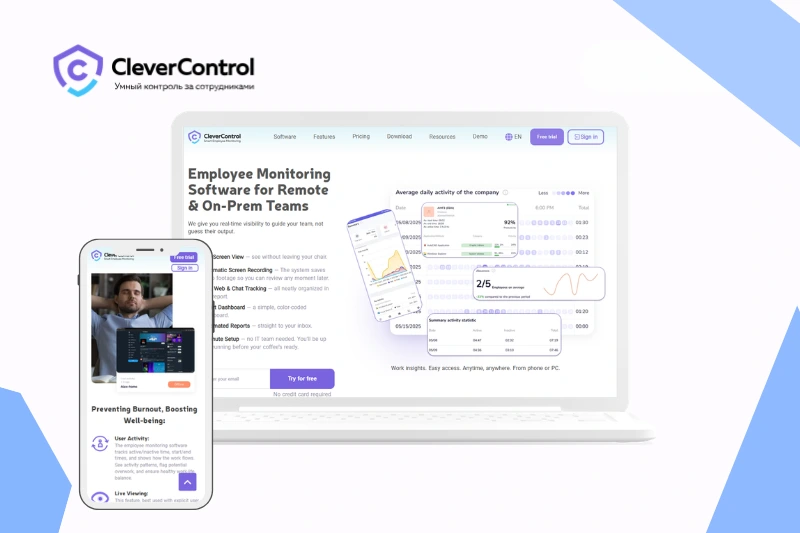
Does your business need effective employee monitoring software? CleverControl is one of the competitors in this market. Its feature-rich functionality is designed to meet the needs of small and mid-sized businesses. But what makes this employee monitoring software attractive to potential users? Our team takes a closer look at CleverControl to explore its key features, pricing, pros and cons, and the best alternatives to consider.
Table of contents:
CleverControl Review: Quick Verdict
- Best for: small and mid-sized businesses that need employee activity and screen monitoring.
- Core features: screenshots, screen recording, live screen view, website tracking, app tracking, and reports.
- Main strengths: broad monitoring coverage, real-time visibility, and cloud-based access.
- Use cases: remote team control, productivity tracking, workflow visibility, and employee PC monitoring.
- Possible drawbacks: may be too monitoring-heavy for teams that only need basic time tracking.
- Worth considering if: your business needs detailed employee monitoring with strong screen visibility.
What Is CleverControl?
CleverControl is employee monitoring software designed for businesses that need better visibility into staff activity on company computers. The platform helps managers track how employees use work time, which applications and websites they access, and how daily workflows are organized across remote, hybrid, or office-based teams.
The software focuses on employee PC monitoring and screen-based visibility. It includes screenshots, screen recording, live screen view, website tracking, application tracking, and activity reports. As a result, businesses can review work patterns, identify productivity gaps, and manage employee computer activity from a centralized dashboard.
CleverControl is mainly aimed at small and mid-sized businesses that want a practical workforce monitoring tool without building a complex internal tracking system. In addition, the platform offers different deployment options, including cloud-based and on-premise solutions, which gives companies more flexibility depending on their infrastructure and data control requirements.

Key Features - What CleverControl Delivers to Your Business
CleverControl offers a broad set of employee monitoring features for companies that need better visibility into daily computer activity. The platform focuses on screen monitoring, activity tracking, web and app usage, and reporting. As a result, managers can review how employees use work time and detect productivity gaps across remote, hybrid, or office-based teams.
Screen Monitoring
Screen monitoring is one of the main features of CleverControl. The software provides screenshots, screen recording, and live screen view, which allows managers to review employee activity visually.
This feature can be useful for businesses that manage remote or hybrid teams. Instead of relying only on manual reports, managers can see how work is performed on company computers during the day.
Business value: real-time visibility, easier workflow review, and stronger control over employee PC activity.
Employee Activity Monitoring
CleverControl tracks employee activity during working hours and helps businesses understand how company devices are used. It can show active and idle time, computer usage patterns, and general work behavior.
In addition, this data helps managers notice repeated distractions, long inactive periods, or inefficient workflows. Therefore, companies can use the information to improve task distribution and productivity control.
Business value: clearer productivity tracking, better workload visibility, and more informed management decisions.
Website and Application Tracking
CleverControl also monitors websites and applications used by employees. This feature helps businesses see which tools, platforms, and online resources take the most time during the workday.
For managers, this data can show whether employees mostly use work-related software or spend time on non-work-related websites. At the same time, it helps identify which applications are essential for daily operations.
Business value: better understanding of digital work habits, app usage, and productivity risks.
Reports and Productivity Insights
The platform collects monitoring data and turns it into reports. Managers can review activity summaries, website and app usage, screenshots, and other employee computer monitoring data from a dashboard.
These reports make CleverControl more useful for regular business oversight. Instead of checking every action manually, companies can use reports to analyze trends and make decisions based on actual activity data.
Business value: structured reporting, faster performance review, and easier team activity analysis.
Deployment Options
CleverControl offers several deployment options, including cloud-based, on-premise, and local versions. This gives businesses more flexibility depending on their internal infrastructure and data control needs.
Cloud deployment may be more convenient for companies that need remote access and simpler setup. On-premise and local options may fit businesses that prefer to keep monitoring data within their own environment.
Business value: flexible setup, better infrastructure fit, and more control over monitoring data.
Additional Monitoring Capabilities
Beyond core screen and activity monitoring, CleverControl includes several additional tools for deeper employee computer monitoring. These may include keystroke logging, removable storage monitoring, printing control, search activity tracking, and chat-related tracking.
These features can be useful for companies that need more detailed visibility into how employees interact with company devices and digital resources. However, not every business will need the full set of advanced monitoring tools.
Business value: broader monitoring coverage for companies with deeper control and security requirements.
Pricing Plans
CleverControl pricing depends on the subscription period and selected option. Longer cloud-based subscriptions offer a lower monthly price per monitored PC.
| Plan / option | Monthly price | Billing period | Notes |
|---|---|---|---|
| 3 months | $11.00 / PC per month | 3 months | Short-term cloud-based monitoring |
| 6 months | $6.60 / PC per month | 6 months | Mid-term option with a lower monthly rate |
| 12 months | $4.70 / PC per month | 12 months | Lowest listed monthly rate for cloud-based monitoring |
CleverControl becomes more cost-effective with longer subscriptions. The 12-month plan offers the lowest listed monthly price at $4.70 per PC/month, while the 3-month plan has the highest monthly rate.
For businesses that need to monitor only one computer, CleverControl provides separate annual options. However, their monthly equivalent is higher than the standard 12-month per-PC rate.
Pros and Cons
Pros
- Broad employee activity monitoring features
- Strong screen monitoring with screenshots, screen recording, and live screen view
- Website and application tracking
- Useful reports for productivity and workflow visibility
- Suitable for remote, hybrid, and office-based teams
- Cloud-based access for easier remote management
- On-premise option for businesses that need more control over data
- Practical choice for small and mid-sized businesses
Cons
- May be too monitoring-heavy for companies that need only basic time tracking
- Limited focus on workforce analytics compared to analytics-first tools
- Some businesses may need more integrations with third-party platforms
- Pricing can increase depending on the number of monitored computers
- Not every team will need the full set of monitoring features
Use Cases
Remote Teams
For remote teams, the platform helps managers review employee activity without direct office supervision. Screenshots, screen recordings, website usage, app activity, and work time data give businesses a clearer view of daily performance.
Hybrid Teams
Hybrid teams work across different locations and schedules. The software helps maintain consistent visibility by showing how employees use company devices both in and outside the office.
In-Office Teams
For office-based teams, employee monitoring can help managers review productivity, detect workflow issues, and understand how work time is used during the day. Activity reports and screen monitoring provide additional visibility without relying only on manual check-ins.
CleverControl Alternatives
CleverControl is not the only employee monitoring software on the market. Depending on business goals, companies may need stronger productivity analytics, deeper screen monitoring, better time tracking, or more advanced reporting. Below are some of the main CleverControl alternatives to consider in 2026.
| Alternative | Best for | Key difference |
|---|---|---|
| Spyrix | All-around employee monitoring | Broader monitoring with screenshots, recording, web/app tracking, and productivity reports |
| ActivTrak | Productivity analytics | More analytics-focused and less screen-monitoring-heavy |
| Hubstaff | Remote team tracking | Stronger time tracking, timesheets, and workforce management tools |
| Time Doctor | Time and productivity tracking | Better fit for teams focused on work hours, attendance, and productivity reports |
| Teramind | Security-focused monitoring | More advanced for insider risk, alerts, and security-oriented oversight |
| Insightful | Workforce visibility | Balanced option for productivity tracking and team performance insights |
| DeskTime | Simple time-based monitoring | Lightweight tool for automatic time tracking and productivity reports |
| Kickidler | Visual employee monitoring | Strong focus on live screen view, screenshots, and screen recording |
For businesses that need a direct CleverControl alternative with strong employee monitoring coverage, Spyrix is one of the closest options to compare. ActivTrak, Insightful, and DeskTime may be better for analytics-led productivity tracking, while Hubstaff and Time Doctor are stronger for time tracking. Companies that need deeper security-focused monitoring may also compare CleverControl with Teramind.
Final Verdict
CleverControl is a capable employee monitoring software solution for businesses that need strong visibility into employee computer activity. Its main value comes from screen monitoring, website and application tracking, activity reports, and flexible deployment options.
The platform can be a practical choice for small and mid-sized businesses, especially remote, hybrid, and in-office teams that need detailed employee PC monitoring. At the same time, it may be too monitoring-heavy for companies that only need simple time tracking or lightweight productivity analytics.
Overall, CleverControl is worth considering if your business needs detailed activity monitoring and visual oversight. However, companies should compare its features, pricing, and alternatives before making a final decision.