



Hubstaff Review: Is This Time Tracking Tool Worth It in 2026?
2026-03-11
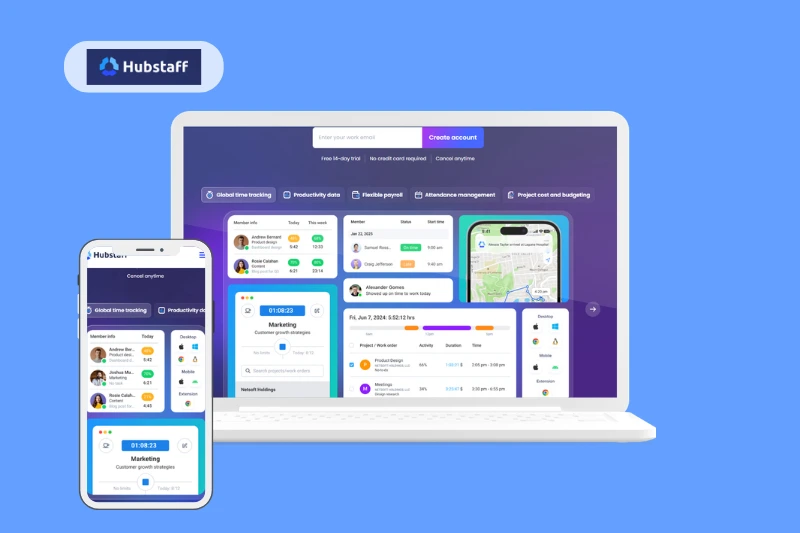
Welcome to our Hubstaff review. This software is one of the most well-known tools designed to solve the problem with managing in-office, remote, and hybrid teams. It offers time tracking, employee monitoring, reporting, and payroll automation as a single platform.
So, is Hubstaff worth it in 2026? For companies managing remote teams, agencies, or outsourced workers, the answer is generally yes. It offers powerful tracking and productivity insights that many competitors lack.
In this review, we’ll take a closer look at Hubstaff’s features, pricing, pros and cons, and how it compares to other time tracking tools.
What Is Hubstaff?
Hubstaff is a time tracking and workforce management platform. It is designed to help businesses monitor productivity, track work hours, and manage remote teams more efficiently.
The software allows companies to record time spent on projects, analyze staff activity, generate performance reports, and automate payroll based on tracked hours.
Hubstaff is commonly used by digital agencies, outsourcing companies, software development teams, and service businesses that bill clients based on time.
The platform works across desktop, web, and mobile apps. Employees can track their work using a timer, while managers get access to dashboards, reports, and productivity insights that help them understand how time is being spent across projects and teams.

Key Features
| Feature | Category | Description |
|---|---|---|
| Time tracking | Time tracking | Track work hours using a desktop timer, mobile app, or manual timesheets. Time entries can be assigned to specific projects and tasks. |
| Automatic time tracking | Time tracking | Starts tracking work automatically when users begin activity on their devices, reducing manual input. |
| Idle time detection | Time tracking | Detects inactivity based on keyboard and mouse activity and prompts users to keep or discard idle time. |
| Activity monitoring | Productivity monitoring | Measures activity levels based on keyboard and mouse usage to estimate productivity during tracked time. |
| Screenshots | Employee monitoring | Optional screenshot capture during work sessions to give managers visibility into what employees are working on. |
| App & URL tracking | Employee monitoring | Tracks which applications and websites are used during tracked work time. |
| Productivity reports | Reporting & analytics | Provides reports on tracked hours, productivity levels, project activity, and team performance. |
| Project tracking | Project management | Allows teams to assign time to projects, monitor budgets, and track project progress. |
| Automated payroll | Payments & payroll | Automatically calculates payments based on tracked hours and pay rates. |
| Invoicing | Payments & billing | Generates invoices based on tracked time and project data. |
| Integrations | Integrations | Connects with tools like Asana, Trello, Jira, Slack, and accounting software. |
| GPS tracking | Field workforce | Tracks location data for mobile teams and field workers. |
Actual Hubstaff Pricing (2026)
Hubstaff uses a per-user pricing model, meaning you pay for each team member who uses the platform. The company offers several paid plans designed for teams of different sizes, from small startups to larger organizations. A 14-day free trial is available, and you don’t need a credit card to start testing the platform.
The pricing structure is fairly straightforward: as you move to higher tiers, you unlock more advanced monitoring, reporting, automation, and workforce management features.
| Plan | Price (per user / month) | Category | Description |
|---|---|---|---|
| Free | $0 | Basic time tracking | A limited plan designed for freelancers. Includes simple time tracking, basic reports, and limited functionality for a single user. |
| Starter | $7 | Time tracking & monitoring | Includes time tracking, timesheets, activity monitoring, optional screenshots, and basic reporting features for small teams. |
| Grow | $9 | Productivity & team management | Adds project budgets, expense tracking, work breaks, advanced reports, and integrations with other business tools. |
| Team | $12 | Workforce management | Includes everything in Grow plus scheduling, payroll support, unlimited integrations, and more advanced reporting tools. |
| Enterprise | $25 | Enterprise workforce management | Designed for large companies that need advanced automation, higher API limits, enterprise security features, and priority support. |
Hubstaff also offers optional add-ons, such as additional analytics tools and advanced workforce insights. Depending on your team size and the features you need, these add-ons can slightly increase the final cost.
Overall, Hubstaff’s pricing sits in the mid-range compared to other time tracking tools, but it offers a broader set of workforce management features than many simpler time trackers.
Pros and Cons
Pros
- Accurate time tracking with desktop, web, and mobile apps.
- Detailed productivity monitoring with activity levels and reports.
- Optional screenshots and app/URL tracking for better visibility.
- Built-in payroll automation based on tracked hours.
- GPS tracking for field and mobile teams.
- Strong integrations with popular tools like Asana, Trello, Jira, and Slack.
- Useful reporting dashboards for managers and project leads.
Cons
- Monitoring features may feel intrusive for some employees.
- Desktop app is required for full tracking functionality.
- Pricing can become expensive for larger teams.
- Basic project management compared to dedicated PM tools.
- Some advanced features only available in higher-tier plans.
Hubstaff vs Competitors - 5 Alternatives
| Tool | Best for | Key features | How it compares to Hubstaff |
|---|---|---|---|
| Time Doctor | Remote team monitoring | Screenshots, productivity tracking, distraction alerts, detailed reports | Very similar monitoring capabilities, but slightly more focused on productivity coaching. |
| Clockify | Free time tracking | Unlimited users on free plan, manual & timer tracking, reports | Simpler and more affordable, but lacks advanced employee monitoring features. |
| Toggl Track | Freelancers & small teams | Lightweight timer, powerful reports, integrations | Much easier to use but does not include employee surveillance features. |
| TimeCamp | Automatic tracking | Automatic time tracking, invoicing, productivity reports | Strong automation features and often cheaper for growing teams. |
| Harvest | Client billing & invoicing | Time tracking, invoicing, expense tracking, project budgets | Better for agencies that bill clients but lacks employee monitoring tools. |