


KeepActive Review (pr. Kickidler): Features, Pricing, and Rebrand Analysis
2026-03-12
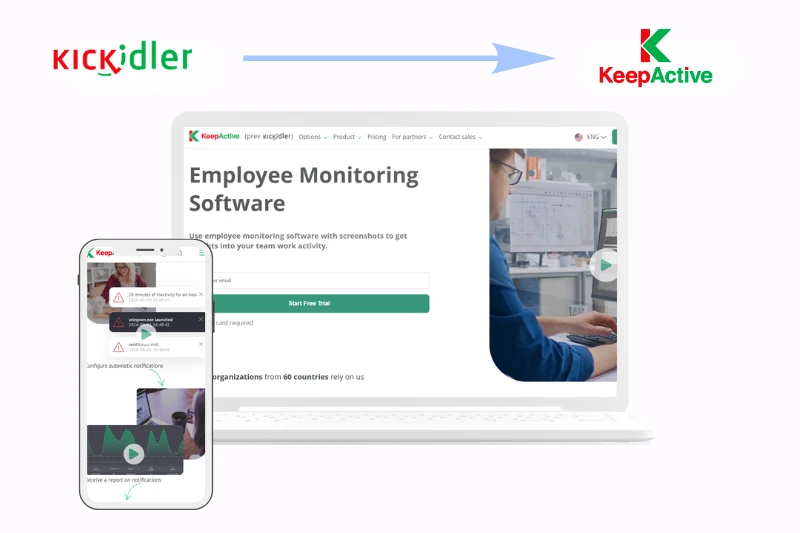
Are you looking for Kickidler? Its new name is KeepActive. The last year for this monitoring software service ended with a rebranding process. Now, the company positions itself as more than just employee monitoring software, presenting itself as an efficient workforce analytics service with DLP features. So, the Spyrix team decided to take a deep dive into this brand and prepare a review of its key features, pricing, and what has changed after the rebrand.
What Is KickIdler or KeepActive?
Kickidler, currently known as KeepActive, is a monitoring software service built for tracking employee activity across office, remote, and hybrid teams. It offers tools for time tracking, productivity reports, screen monitoring, and data protection features. With the rebrand, the company shifted its messaging from classic employee monitoring to workforce analytics and deeper business insights.

Key Features
| Feature | Category | Description |
|---|---|---|
| Time tracking | Time tracking | KeepActive automatically collects employee activity data and uses it for tracking work hours, attendance, and overall time spent at the computer. |
| Working hours report | Reporting | This report shows total time spent working, including late arrivals, early departures, and general employee work-hour statistics. |
| Timesheet | Reporting | A consolidated report on hours worked during a selected period, designed to simplify HR and accounting processes. |
| Time report | Reporting | This report ranks the most frequently used applications and websites based on how much time employees spend in them. |
| Reports on web pages and apps | Productivity analysis | This feature helps analyze in detail how much time employees spend in specific websites and applications. |
| Productivity analysis | Workforce Analytics | KeepActive analyzes employee computer activity to show how productively working time is used and how efficient individual employees or teams are. |
| Efficiency report | Productivity reporting | The Efficiency Report provides an overview of employee or department efficiency, including which websites and apps are used during working hours. |
| Day’s details report | Productivity reporting | This report gives a more detailed view of employee activity, including productive and unproductive periods, as well as start and end times of the workday. |
| Dynamics report | Productivity reporting | The Dynamics Report helps evaluate how employee efficiency changes depending on the time of day or day of the week. |
| Activity history | Activity monitoring | Activity History shows the chronology of employee actions on the computer throughout the day, including websites, titles, and time spent on them. |
| Online screen monitoring | Visual monitoring | Managers can view an unlimited number of employee screens online to see who is working, absent, or potentially violating company rules. |
| Screen video and audio recording | Visual monitoring | The platform can record and store video and audio history of employee activity at their computers for later review. |
| Violation detection | Alerts and compliance | KeepActive can detect irregularities, schedule violations, and other unusual employee activity and link them to recorded history for review. |
| Keylogger | Monitoring / security | The software can record keystroke history and provide video-based keystroke logging for monitoring and investigation purposes. |
| Remote access | Administration / IT | Administrators can remotely connect to an employee’s computer and, if necessary, disable the mouse or keyboard. |
| Self-monitoring interface | Employee-facing tools | KeepActive includes a self-monitoring interface that allows employees to track their own productivity and improve focus. |
| Automatic notifications | Alerts and self-monitoring | Users can configure automatic notifications for extended idle periods, workload issues, scheduling gaps, and other activity-based triggers. |
| Project tracking | Project monitoring | The Project Tracking module helps teams monitor real time spent on projects and tasks, productivity, workload intensity, and team performance. |
| Employee tracking dashboard | Dashboard / analytics | The dashboard provides a centralized overview of work hours, project progress, and productivity metrics. |
| File transfer tracking and blocking | DLP | This DLP feature helps track file movement inside the organization and restrict unauthorized file transfers through websites, email, messengers, and social networks. |
| Protection against photographing the screen | DLP | KeepActive includes a feature designed to detect or block attempts to capture sensitive information by photographing the screen. |
| User behavior analytics | DLP / security analytics | The platform can flag unusual user behavior patterns that may indicate potential data leaks or other risks. |
| Digital file prints | DLP | This functionality provides visibility into the printing or transfer of digital documents and helps track changes in critical files. |
| Clipboard monitoring | DLP | Managers can review text, files, and images copied to the employee’s clipboard. |
| File operations monitoring and management | DLP | The system can monitor duplication, deletion, and transfer of files, and create shadow copies when files are copied to external storage. |
| Global search | Investigation / DLP | Administrators can search across the employee database by tags, window titles, keylogger records, websites, and apps. |
Pricing - What KeepActive Costs?
KeepActive offers three main pricing plans depending on the level of monitoring and analytics a company needs. The Time Tracking plan starts at $5 per user/month, the Employee Monitoring plan starts at $10 per user/month, and the DLP plan starts at $15 per user/month. Based on the pricing page, the service also offers discounts for longer billing periods, including 3 months, 6 months, 1 year, 3 years, and a perpetual license option.
At first glance, the pricing structure looks quite straightforward. The entry plan covers basic time tracking and productivity analysis, the middle plan adds more advanced employee monitoring features, and the DLP tier is designed for companies that need stronger data protection and insider risk prevention tools.
Rebrand Analysis of KickIdler
During the transition from Kickidler to KeepActive, several key changes took place:
- The messaging has changed. KeepActive is presented as a workforce analytics platform rather than just employee monitoring software.
- The product focus is still familiar. Core features still revolve around time tracking, screen monitoring, productivity analysis, and DLP tools.
- The tone became softer. The new brand sounds less control-oriented and more analytics-driven.
- The transition is still visible. The company continues to use the wording “prev. Kickidler”, which keeps the connection with the old brand.
- Overall impression: the rebrand looks stronger on the marketing side than on the product side.
Overall, KeepActive remains a feature-rich employee monitoring platform with solid time tracking, productivity analysis, and DLP capabilities. While the rebrand from Kickidler makes the product look more analytics-focused and modern, its core functionality still stays close to its original monitoring-oriented foundation.